UX / UI Design — Infrastructure Tech

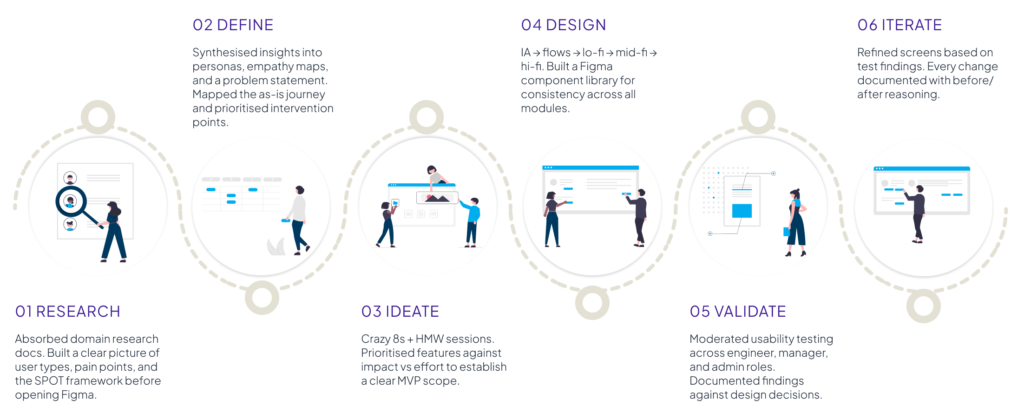
Project Flow

A unified data management platform for engineering teams — turning fragmented project knowledge into a searchable, reusable single source of truth.

Role
UX / UI Designer
Sector
Engineering & Infrastructure
20 Weeks
Platform
Web App — Desktop First

My Contributions

10+

Core screens designed across 4 primary modules

Responsibilities
Information Architecture · User Flows · Wireframes · UI Design · Design System · Prototyping · Usability Testing · Design Iterations

Project Background

Where data goes to die and why that mattered

Engineering firms delivering large infrastructure projects hold decades of valuable knowledge, but most of it remains scattered across folders, emails, and individual teams.

As a result, projects often start from scratch. Engineers waste time searching for references, and managers lack a clear portfolio view.

Project Flow was built to solve this — helping teams access past and active projects faster, track project status in real time, and create a more connected way of working.

The Existing Problem
  • No single place to find or compare past projects
  • Knowledge lost when team members leave
  • Every project starts completely from scratch
  • No audit trail for deliverables or decisions
Workflow Issues
  • Multiple disconnected tools not integrated
  • Manual effort to compile deliverables
  • Version control informal or non-existent
  • Historical data required days of chasing people
Business Impact
  • Engineers spend time searching, not designing
  • Inconsistent quality across client deliverables
  • Can’t benchmark new work against past work
  • Lost institutional knowledge compounds over time

My Role & Responsibilities

Where i stepped in

I joined after the foundational research phase. My role: translate existing insights into interfaces.

Completed Before My Involvement

These activities were owned and executed by the client’s domain team and stakeholders prior to my engagement:

  • User interviews with engineers and project managers
  • Domain research and expert knowledge synthesis
  • Single Point of Truth (SPOT) framework development
  • Building Block approach conceptualisation
  • Initial data architecture strategy
  • Platform technical requirements gathering
“My role focused on translating existing research insights into user-centred experiences — not generating the research.”
What I Owned
  • UX workflow creation and user journey mapping
  • Information architecture and site mapping
  • User flow design (task flows, decision points)
  • Low, mid, and high fidelity wireframes
  • UI design and visual design direction
  • Design system and component library
  • Interaction design and micro-interactions
  • Prototype creation in Figma
  • Facilitation of usability testing
  • Design iterations based on feedback

Problem Statement

“Engineering teams cannot efficiently access, compare, or build upon historical and active project data — resulting in repeated effort, inconsistent output quality, and an institutional knowledge gap that grows wider every year.”

Synthesised from domain research — Project Flow

Current Challenge

No unified place to find, compare, or store project data across the organisation.

User Pain Point

Users spend time hunting for information rather than designing and engineering.

Business Impact

Inefficiency compounds at scale — every hour searching is an hour not delivering.

Why Is It A Problem?

Root cause, not just symptoms

The data fragmentation wasn’t a technical failure — it was a cultural and organisational one. Understanding the root cause changed how I approached the design.

The real problem was behavioural, not technical

What people assumed was the cause
  • The right software hadn’t been built yet
  • Engineers weren’t disciplined enough about saving data
  • The data didn’t exist to share
What research actually revealed
  • Existing tools were too slow or painful to use consistently
  • There was no feedback loop — contributing felt thankless
  • The data existed — it was just invisible and inaccessible

Goals & Success Metrics

What success looks like

Business Goals
  • Centralise all project data in one platform
  • Standardise delivery workflows across teams
  • Enable knowledge reuse and reduce rework
  • Scalable archive of historical projects
  • Support data-driven leadership decisions
User Goals
  • Find comparable past projects in seconds
  • See changes and due items at a glance
  • Compare KPIs across projects easily
  • Access reliable, up-to-date data instantly
  • Monitor project health & deliverable status
Success Metrics / KPIs
  • ↓ Time spent searching for project data
  • ↑ Reuse rate of past project building blocks
  • SUS usability score above 80
  • Task completion rate above 85% in testing
  • ↓ “Data hunting” time per project start

Target Audience

Who this is build for

Primary Users

Secondary Users

Structural / Bridge Engineers

Technical professionals who need quick access to past project data, design standards, and calculation templates to speed up design validation.

Digital / BIM Coordinators

Administrators and quality teams responsible for data accuracy, digital delivery compliance, and maintaining the platform’s building block library.

Design / Project Managers

Management teams who need portfolio visibility, project tracking, and task management across multiple projects.

Platform Administrators

Technical superusers who manage platform access, data integrity, and the central knowledge library while keeping the platform aligned with evolving project needs.

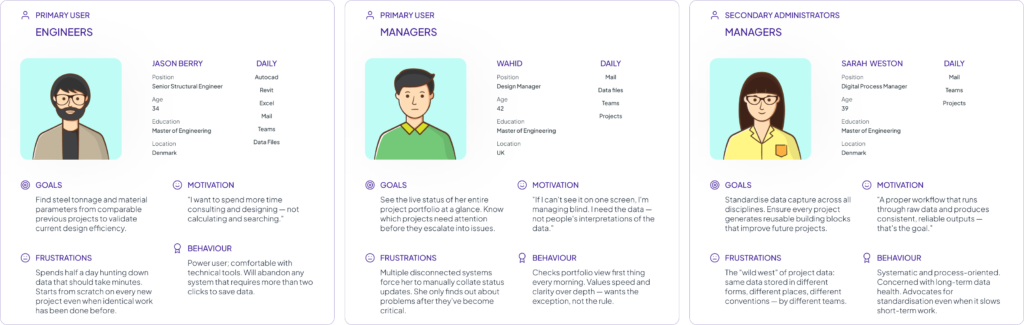
User Personas

Three people, one platform

Derived from the research insights provided, these personas represent the primary user archetypes across the platform. Each brings distinct needs, motivations, and frustrations that shaped design decisions throughout the process.

Research Insights

What the research revealed

Key patterns from stakeholder interviews conducted by the client’s domain team — the foundation for all design decisions.

The Knowledge Retrieval Problem

Getting historical data could take “days rather than seconds.” Finding a comparable project meant navigating multiple systems and hoping the right person still worked there.

The “Starting From Scratch” Pattern

Every stakeholder independently described frustration with beginning new projects as if nothing similar had ever been done — despite decades of institutional experience.

Speed is Non-Negotiable

“Blazingly fast” search. No more than 2 clicks to save. Any friction causes engineers to revert to personal drives and email — making the system invisible.

Managers Need Signals, Not Data

PMs didn’t need granular technical data — they needed live project health, resource status, and delivery flags. Exceptions surfaced automatically, not buried in spreadsheets.

Adoption is a UX Problem

Mandating systems without user buy-in produces compliance theatre. Any solution needs to feel natural — not like an admin burden. UX is what drives real adoption.

Everything Must Connect

Multiple stakeholders independently described the same vision: project inputs, analysis, deliverables and management data all linked to one underlying source of truth (SPOT).

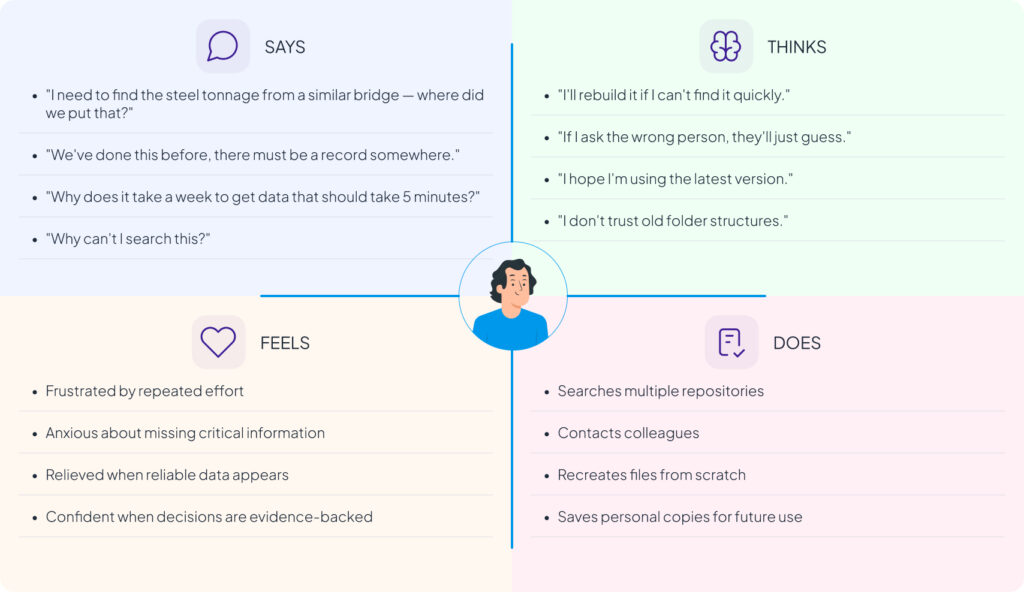
Empathy Mapping

Inside the engineer’s mind

Built from synthesised research insights, this empathy map reflects the mindset of the primary user — a structural engineer dealing with daily data friction.

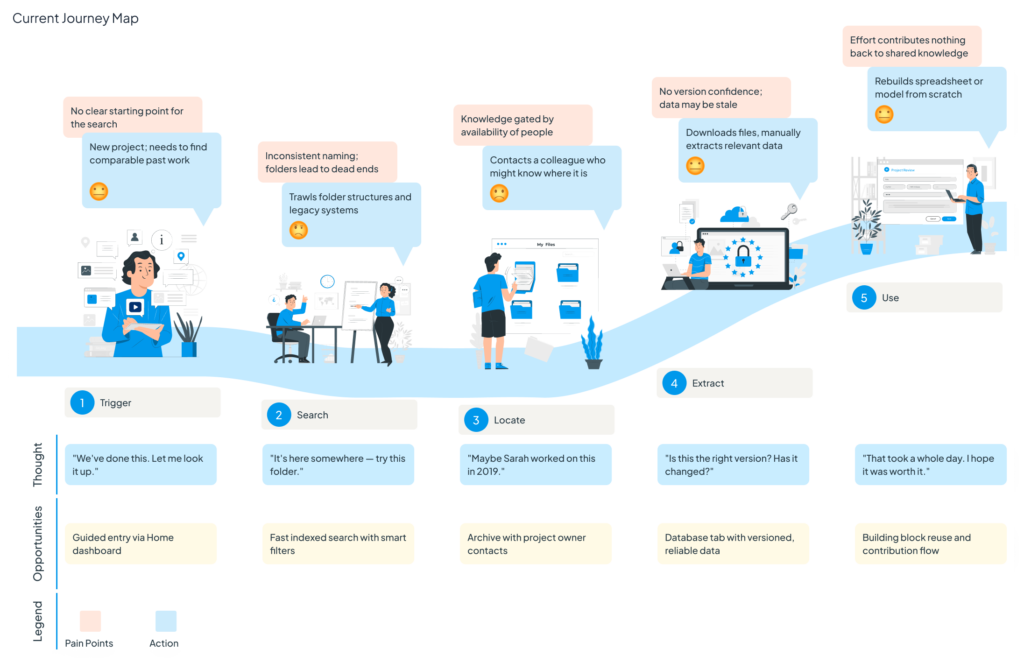
Current Journey Map

The painful path

This map traces the experience of an engineer starting a new project and attempting to leverage past work. Every stage contains friction, delay, and uncertainty.

How Might We Statements

Reframing problems as opportunities

Reduce search time from days to seconds for comparable project data?

Make starting a new project feel like building on solid foundations?

Give managers a live portfolio view with zero manual data collection?

Enable project parameter comparison without manual spreadsheet work?

Show connections between projects, data, and people without overwhelming the UI?

Create a 3D viewer that adds genuine value beyond being visually impressive?

Make saving data so frictionless that engineers actually want to do it?

Ensure institutional knowledge doesn’t leave when team members do?

Design navigation that works for both engineers & managers — despite different mental models?

Brainstorming & Ideation

Generating and prioritizing ideas

After mapping the research into HMW statements, I ran an ideation phase to explore the full solution space before committing to a design direction. The goal was to diverge first — even wild ideas — then converge on what was viable, desirable, and technically feasible.

Crazy 8s Concepts

Eight concepts explored in rapid sketching included: a command-line style search interface, a project graph/network visualisation, a Kanban-style portfolio board, a file-system-like hierarchical browser, a chat-first interface with a project assistant, a map-based archive for geographic search, a comparison table tool, and a dashboard-first single-page approach. The map-based archive, the dashboard overview, and the comparison approach all survived to IA exploration.
Prioritisation Matrix

Feature

Impact

Effort

Projects Dashboard

High

Medium

Archive + Search

High

High

3D Model Viewer

Medium

High

Building Blocks

High

High

Project Comparison

High

Medium

User Flow

Finding precedent data – the critical path

This core user flow traces the journey of an engineer searching for a comparable past project. It was the most frequently cited task in the research and became the primary design test case.

Decision point: If a project is found → view details → choose to clone or extract building blocks. If no results → refine filters or save search. The flow supports both “browsing to discover” and “searching for a specific known project.”

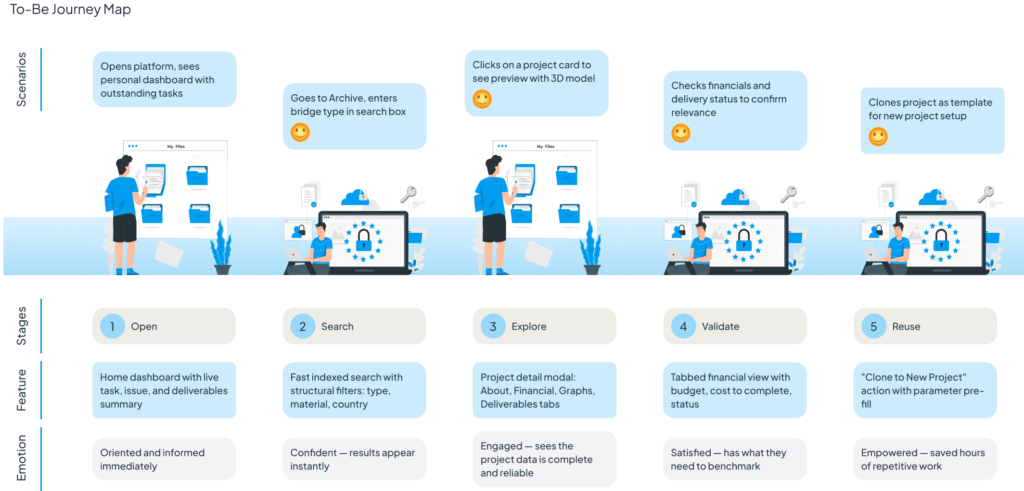
To-Be Journey Map

The experience we designed towards

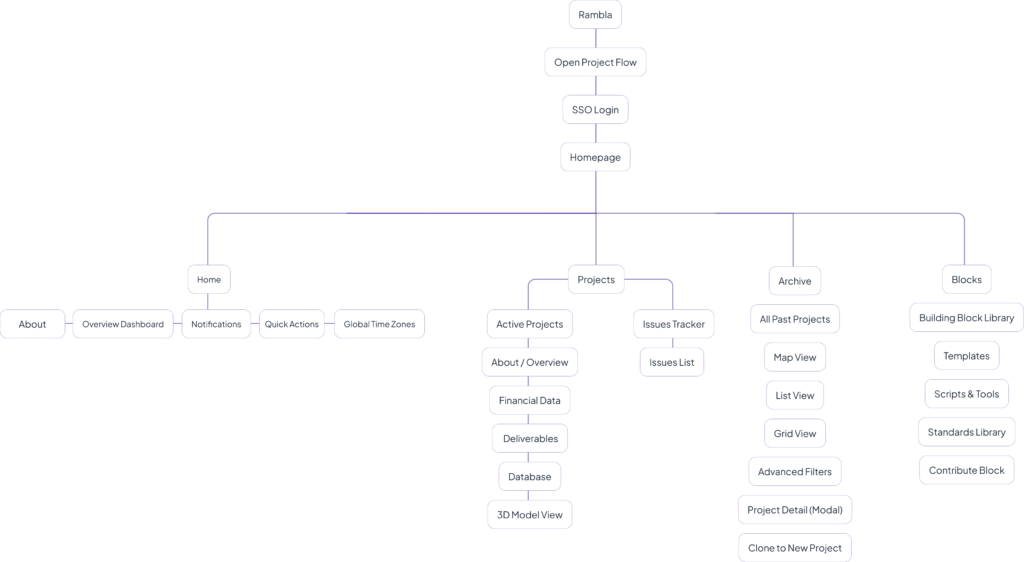
Information Architecture

Structuring the knowledge space

The IA was built around four primary navigation destinations, each serving a distinct job-to-be-done. The hierarchy is shallow by design — users should reach any critical view in two clicks or fewer.

* A simplified and anonymized section of the information architecture, showing how content and workflows were organized while keeping project details confidential.

More project artifacts and design documentation can be shared during interviews upon request.

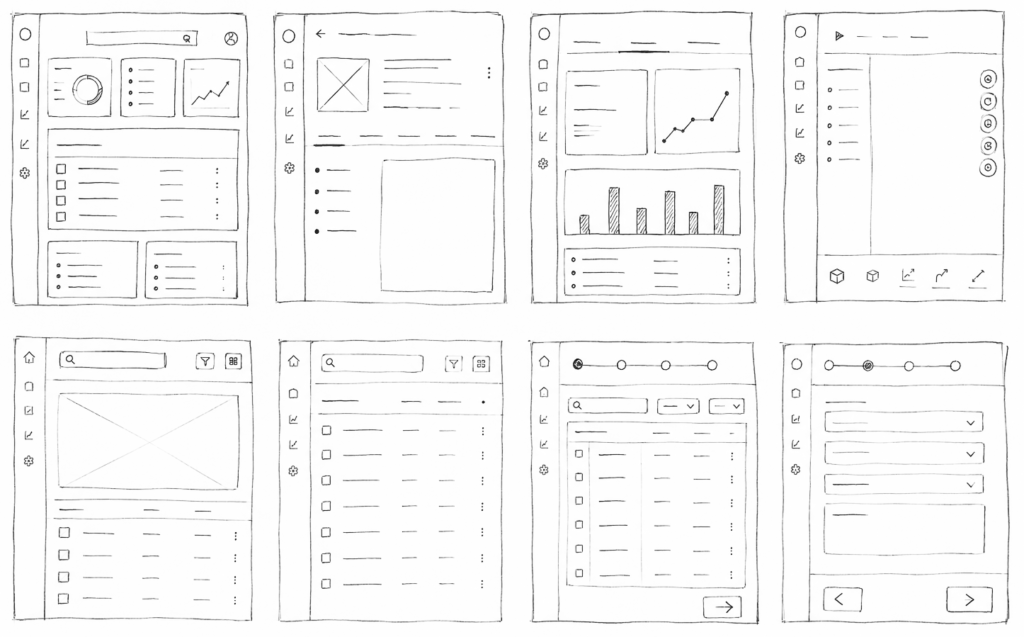
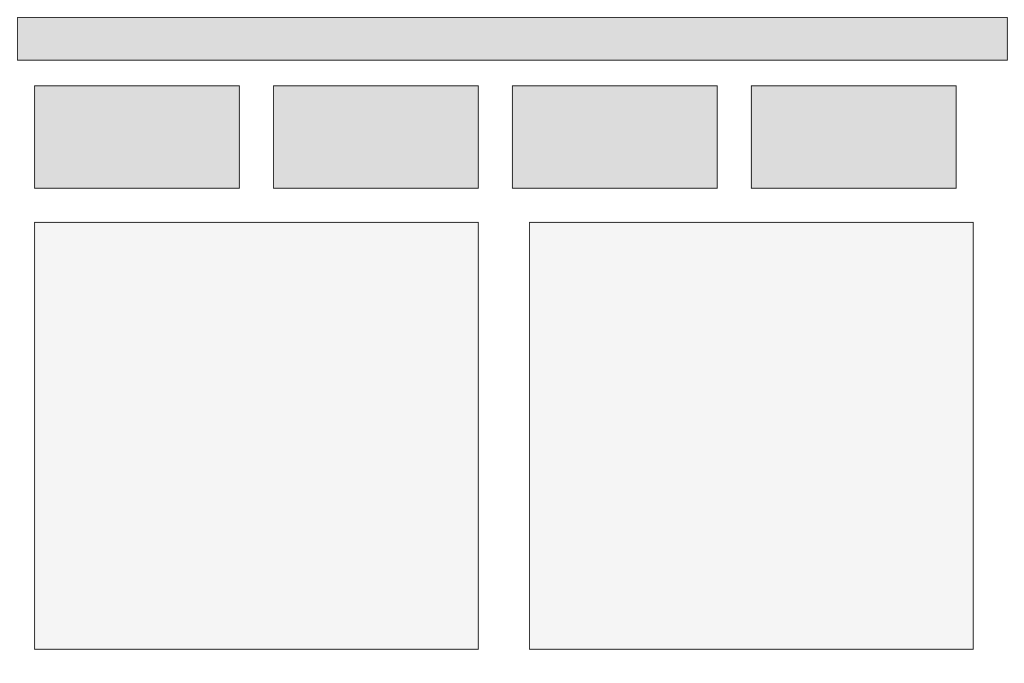
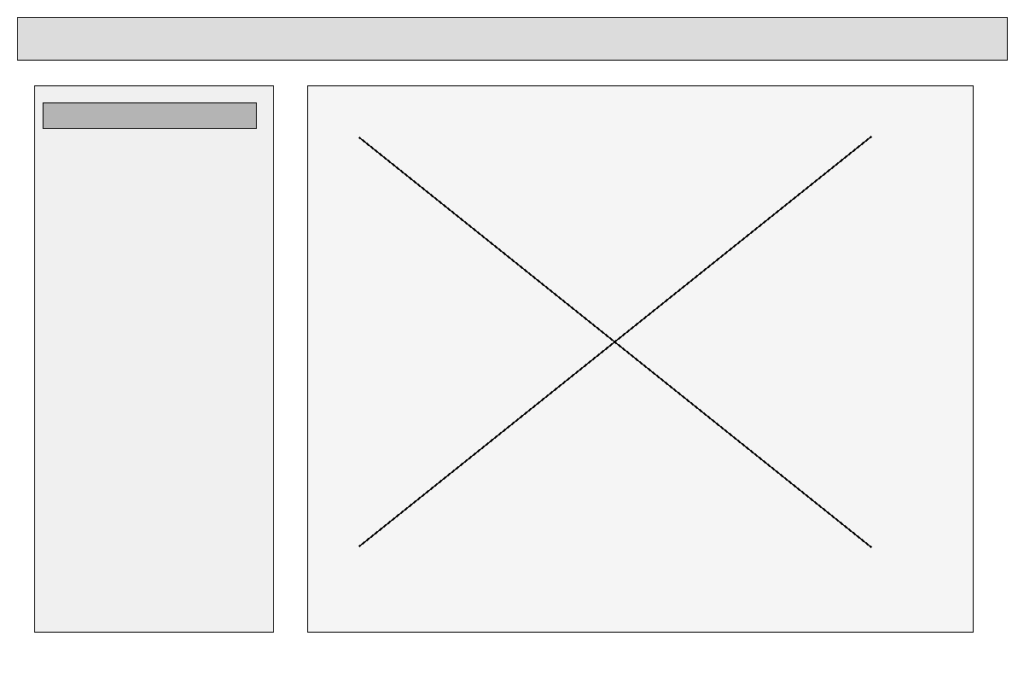
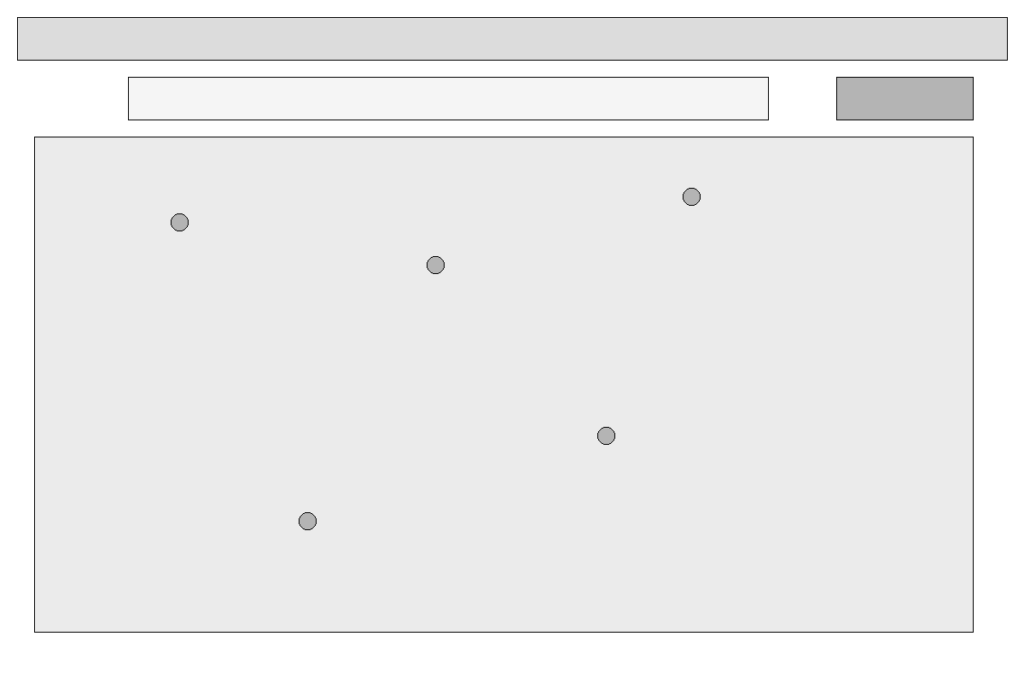
Low-Fidelity Wireframes

Early concepts and layout thinking

The wireframe phase explored structure, hierarchy, and content priority before any visual decisions. Key questions at this stage: What does the user see first? What can they do in one click? How does the layout scale across the four primary modules?

Visual Design Direction

Precision, clarity, accessible

The visual language needed to communicate trustworthiness and technical precision — a platform that handles consequential data for engineers making serious structural decisions. The design direction drew on the aesthetic codes of modern engineering software: clean, structured, information-dense without being cluttered.

Clarity First

Every element earns its place. Data is the hero — UI chrome stays minimal. Status, actions, and navigation are immediately obvious without explanation.

Responsive Speed

Visual feedback is immediate. Loading states, hover effects, and transitions signal that the system is responsive — never leaving users wondering if something worked.

Structured Hierarchy

A strict typographic and spatial hierarchy ensures users can scan, not read. Headlines, data labels, body copy, and metadata all have clearly differentiated visual weights.

Design System & Visual Language

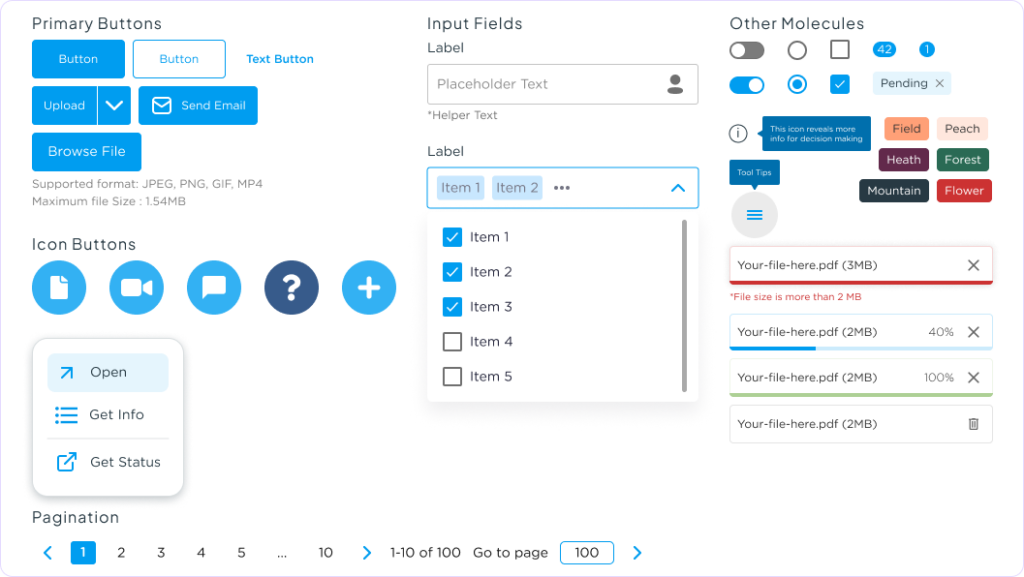
Creating a scalable and consistent experience through Atomic Design principles.

Atoms

Design Tokens

The smallest building blocks of the interface.

  • Color palette
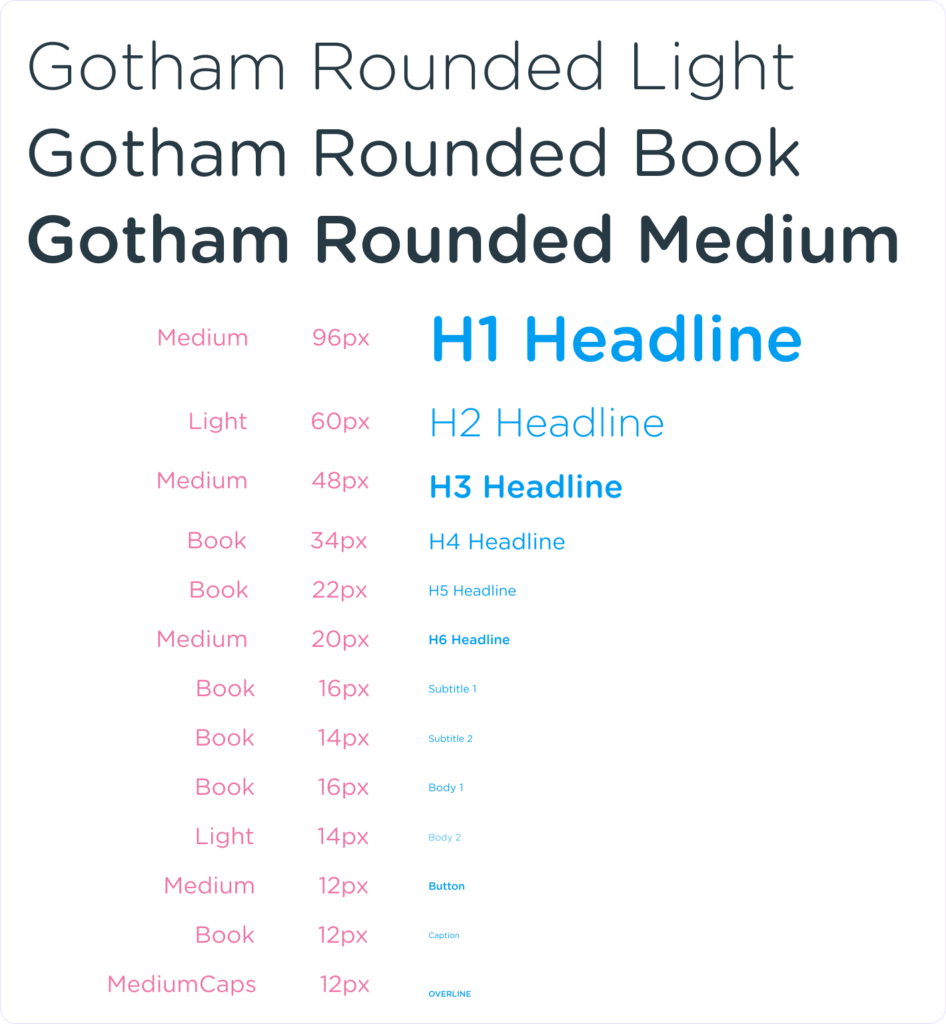
  • Typography
  • Spacing
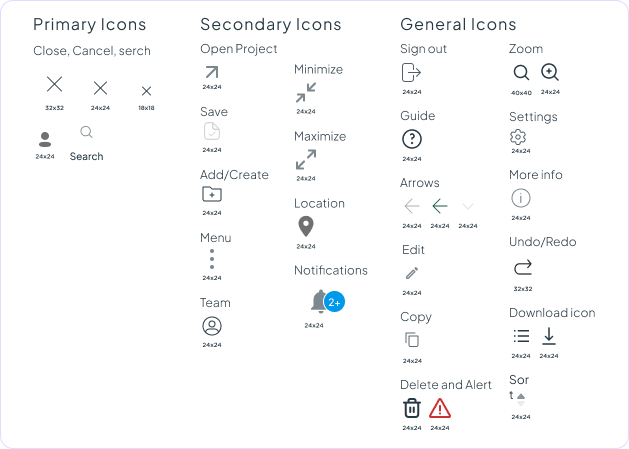
  • Icons
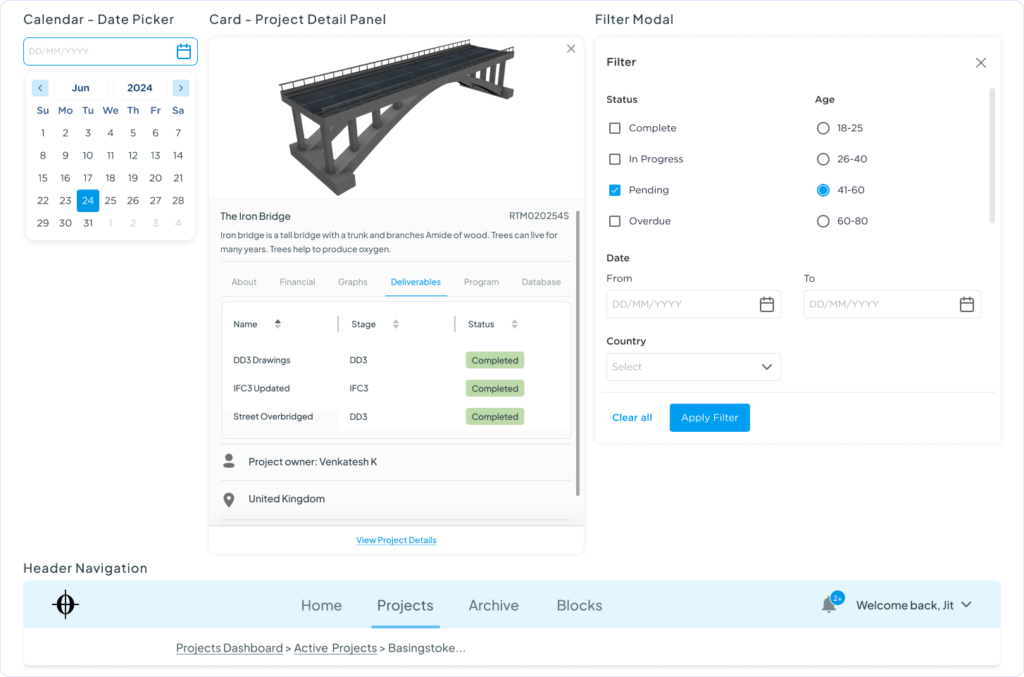
Molecules

Core Components

Groups of atoms combined to create reusable UI elements.

  • Buttons
  • Checkbox
  • Search bar
  • labels
  • Alert
  • Chips
  • Dropdown filters
  • Input fields
Organisms

Interface Patterns

Larger interface sections made from multiple components.

  • Notification Center
  • Archive Explorer
  • Project Overview
  • Data Table
  • Cards
  • Archive Search Panel
Templates

Screen Layout

Reusable page structures that define layout and hierarchy.

  • Dashboard layout
  • Project detail layout
  • Archive layout
Pages

Final Screens

Final screens populated with real content and data.

  • Dashboard
  • Project Overview
  • Financial & Carbon
  • 3D Viewer
  • Archive
Atoms – Design tokens

Color palette

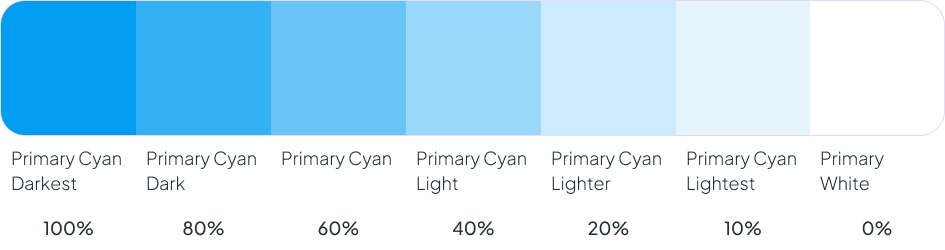
Primary Color – Action

Used for primary actions, links, selected states, active navigation, and key interactions.

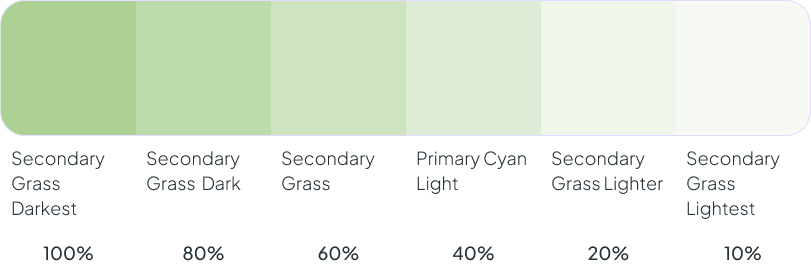
Success Color

Used for completed actions, healthy project status, successful uploads, and positive feedback.

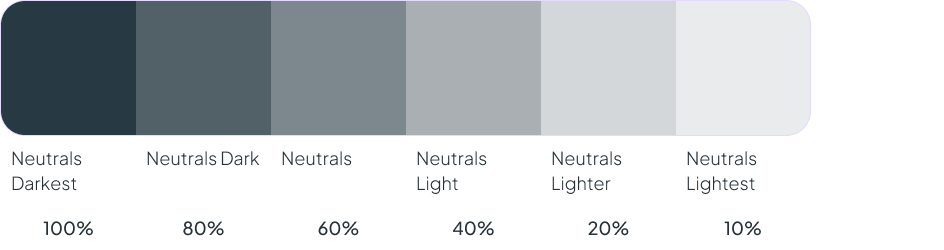
Neutrals

Used for layouts, borders, backgrounds, dividers, tables, typography, and surfaces.

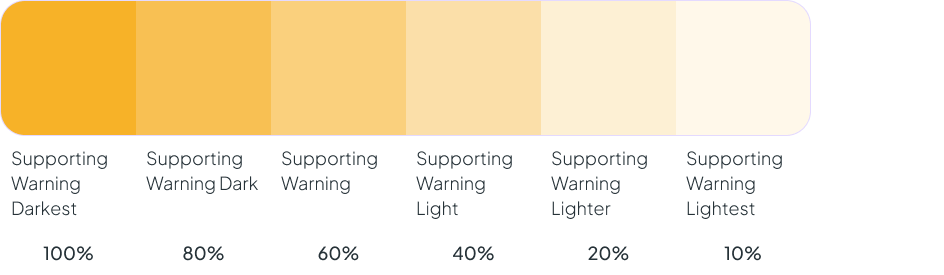
Warning

Used for project risks, deadlines approaching, incomplete information, and validation warnings.

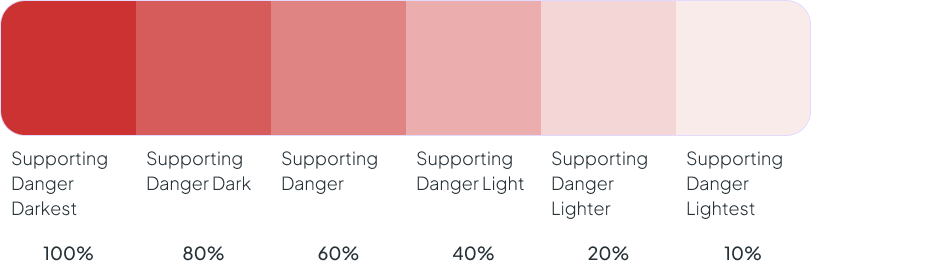
Critical

Used for errors, blocked workflows, failed uploads, and high-priority issues.

Typography

Icons

Molecules – Core Components
Organisms – Interface Patterns
Templates – Screen Layout

Screens

Hi-Fidelity Screens Design – Pages

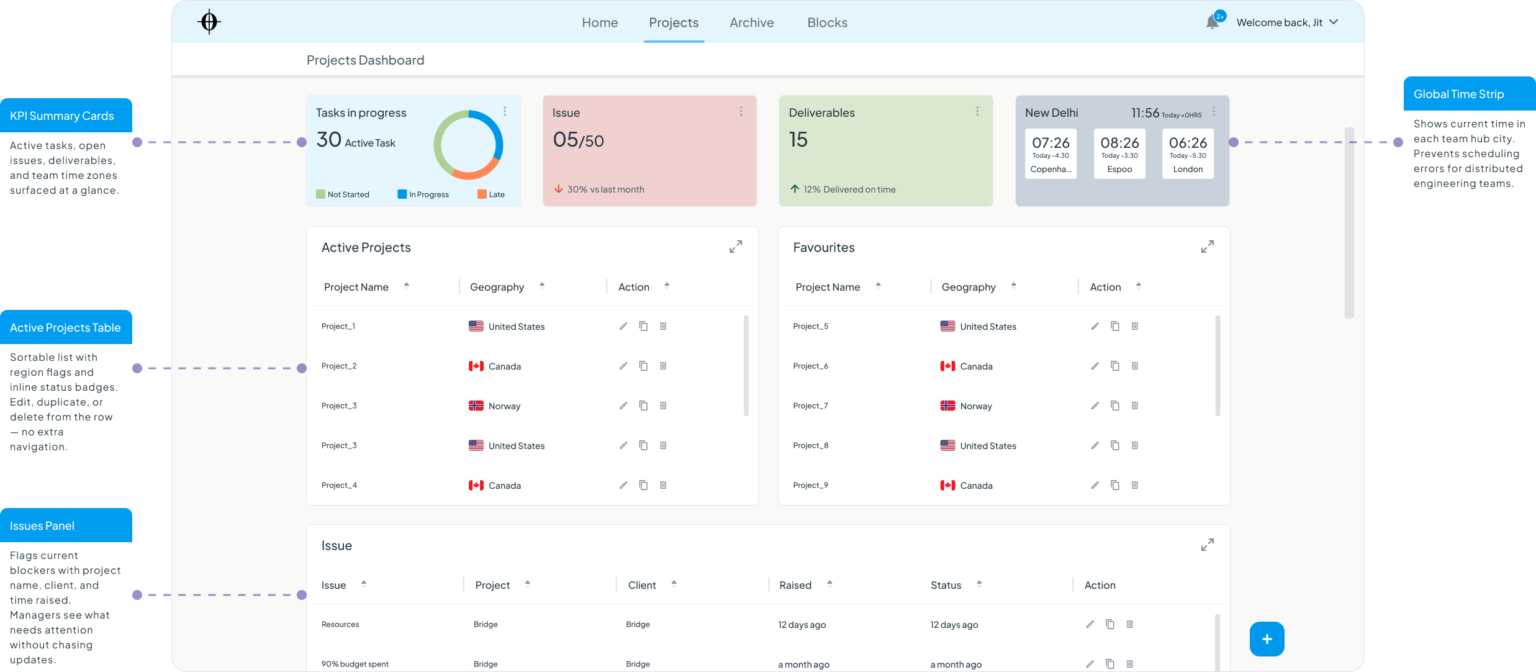
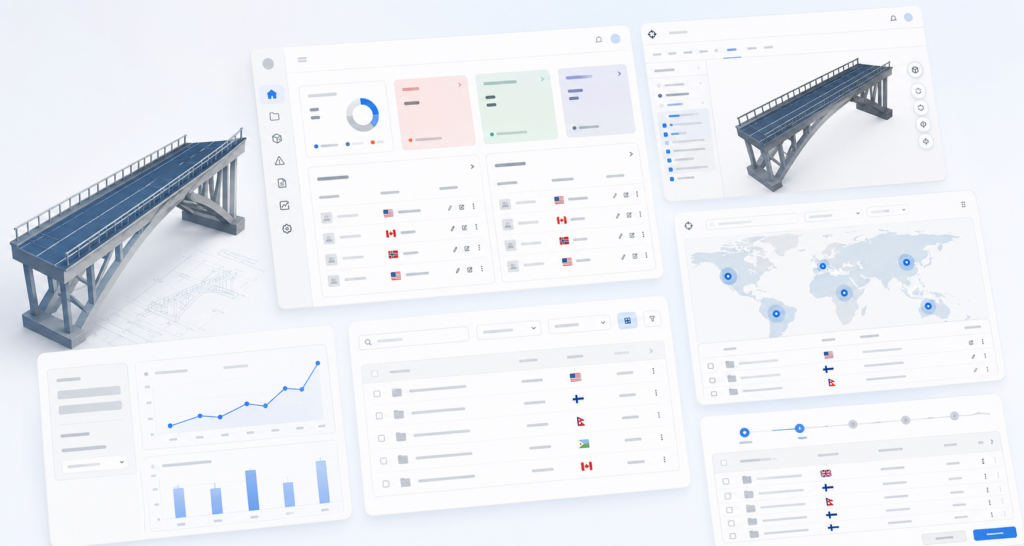
Projects Dashboard

The first screen managers see each morning. Designed so that the most critical information — open issues and late tasks — is impossible to miss, without requiring any configuration.

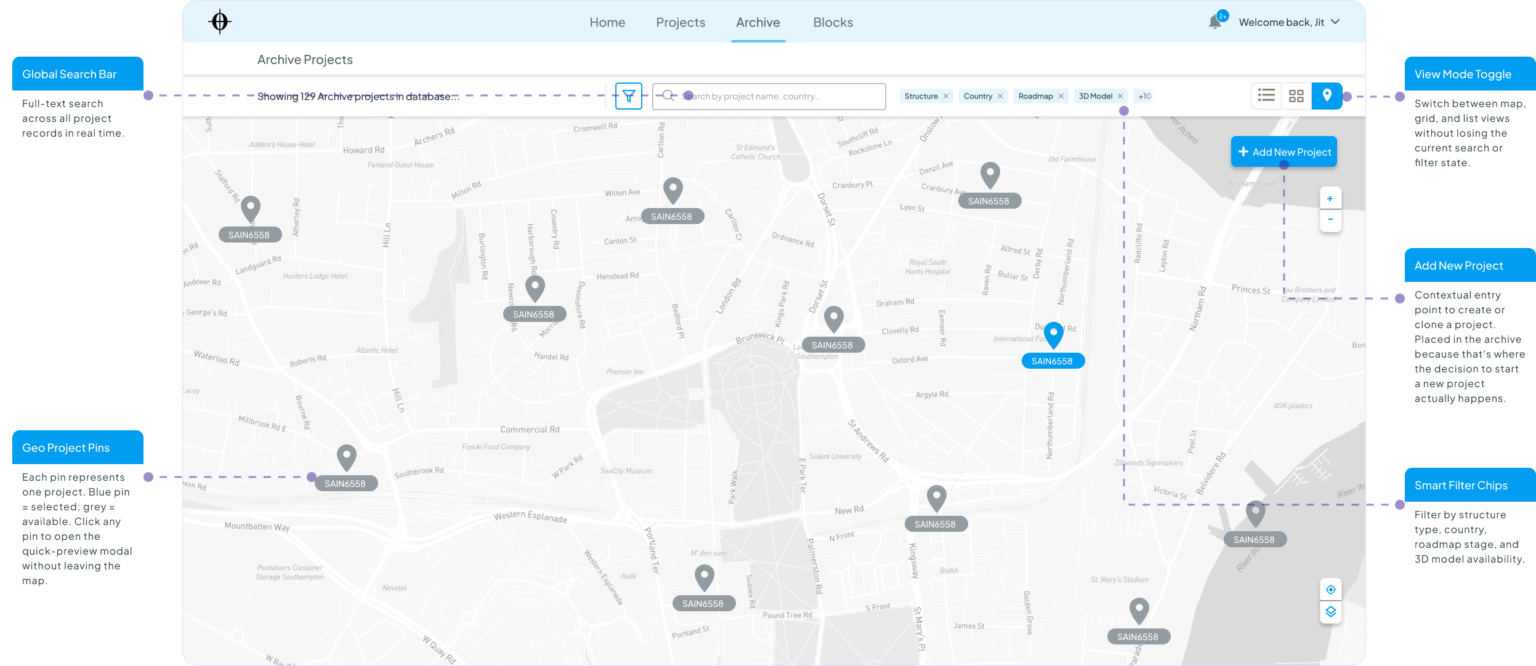
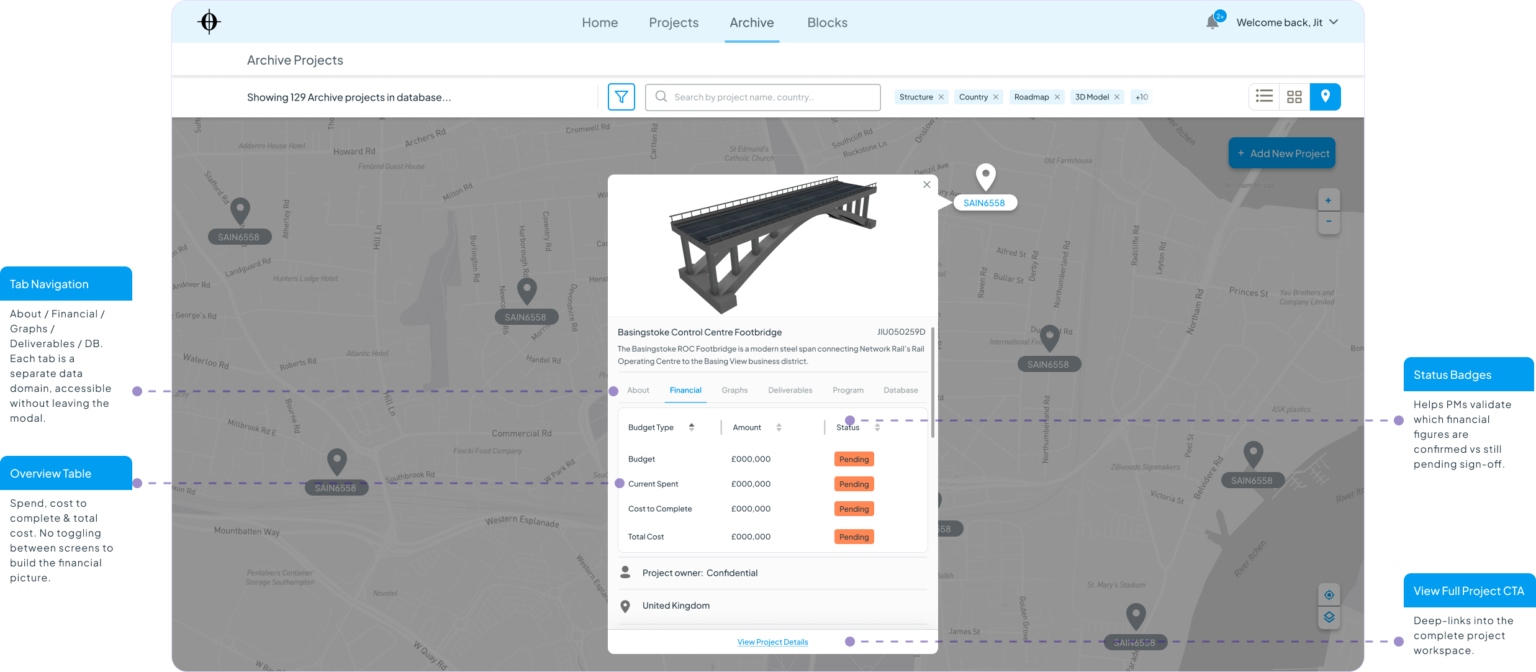
Archive — Map View

The discovery surface for the platform. Engineers land here when starting a new project — searching by geography and structure type to find the most relevant precedent in seconds, not days.

Project Detail — Financial Tab

A contextual preview layer that appears on archive map or list click. Gives engineers enough financial and contextual data to judge whether a past project is worth cloning — without committing to opening it fully.

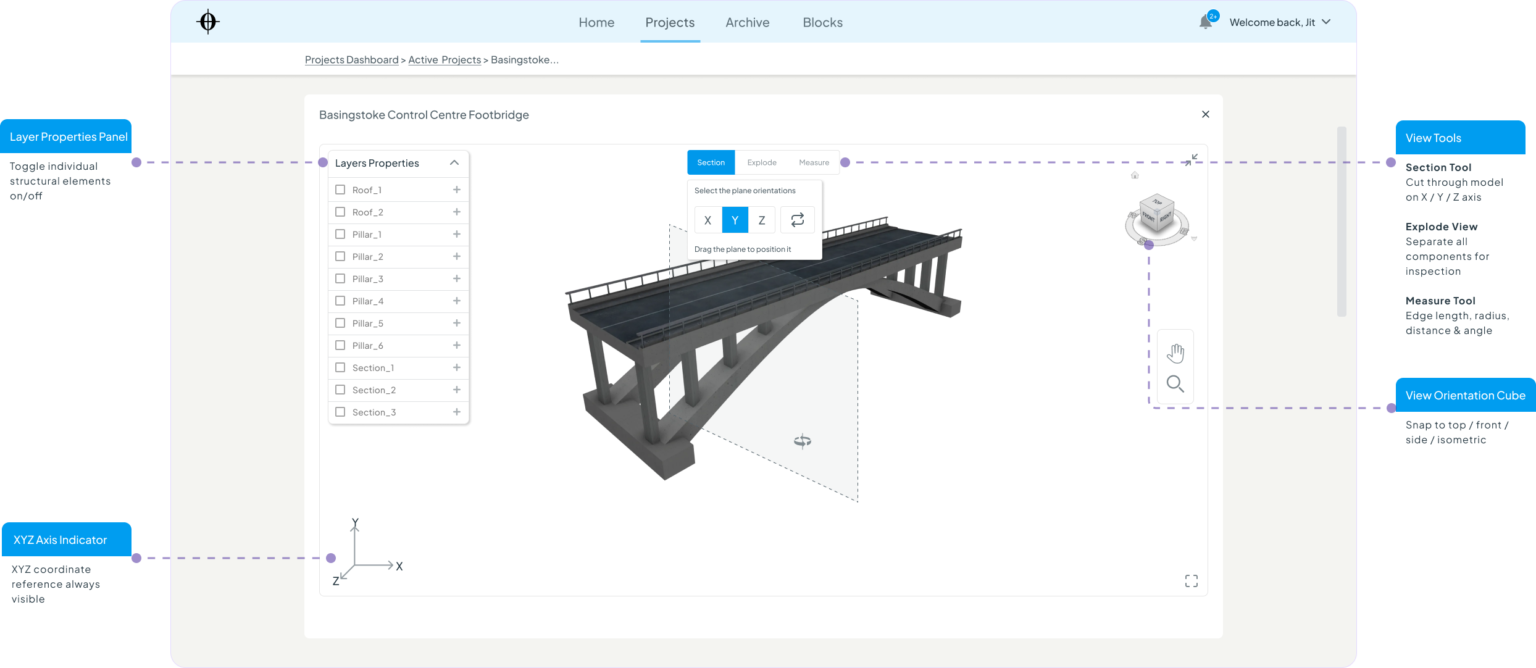
3D Model Viewer

Elevated from “nice to have” to a core feature during the revised hypothesis stage. For engineers evaluating whether a past project is relevant to a new brief, seeing and interrogating the actual structural model is a primary validation step — not a secondary one.

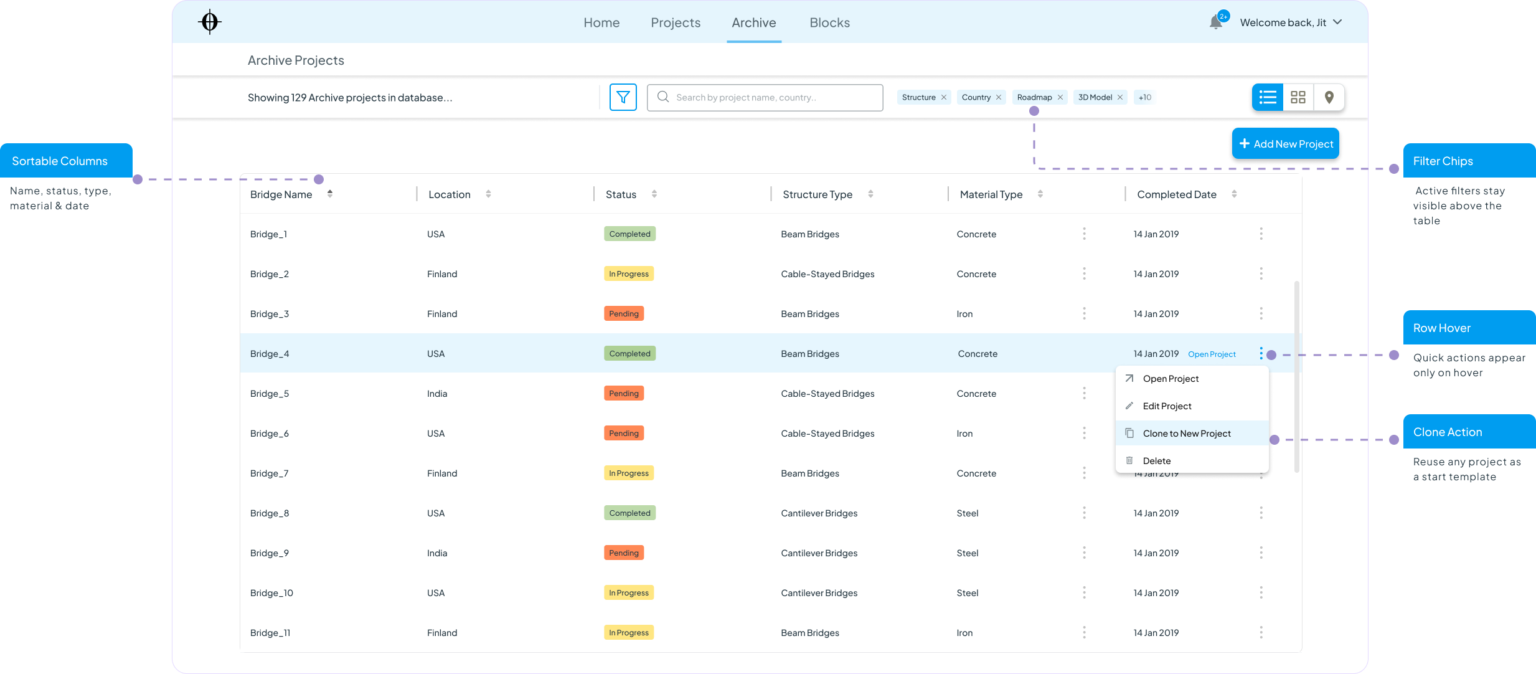
Archive — List View & Clone Project

The alternative to the map view for users who prefer to scan data in structured rows. The Clone to New Project action — surfaced prominently here after failing as a buried overflow option in usability testing — is the platform’s most valuable productivity shortcut.

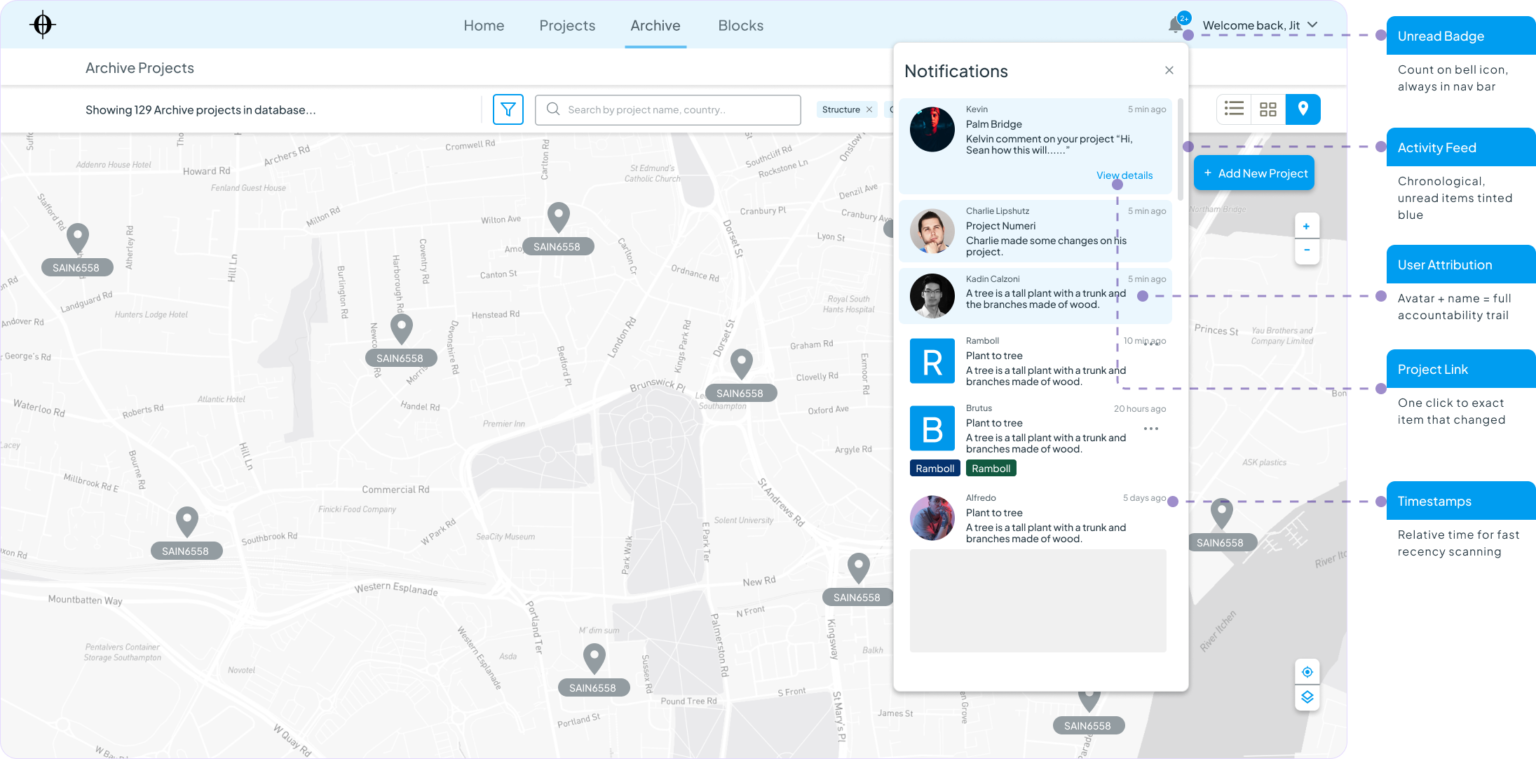
Notification Centre

The awareness layer of the platform. Keeps distributed engineering teams aligned on what’s changed without requiring status meetings or manual check-ins. Unread items are visually distinct so engineers can triage in seconds.

Failed Ideas

What I tried that didn’t work

These concepts were explored, prototyped or sketched — and rejected. Each failure taught me something that made the final design better.

Failed Concept 01

Chat-first interface with a “project assistant”

The idea

Let engineers ask questions in natural language — “show me cable-stayed bridges in Finland under £2M” — and have the platform respond like a search assistant.

Why I explored it

The research showed users wanted “blazingly fast” access. Conversational search felt like the most frictionless entry point.

Why it failed

  • Engineers didn’t know how to phrase queries — blank chat box created anxiety, not ease
  • No visual feedback about what was available to search — users didn’t know the scope
  • Felt like a prototype demo, not a reliable production tool for serious work

What it led to: Structured filter chips that make the search scope immediately visible — users can see what’s filterable before they type anything.

Failed Concept 02

Chat-first interface with a “project assistant”

The idea

Let engineers ask questions in natural language — “show me cable-stayed bridges in Finland under £2M” — and have the platform respond like a search assistant.

Why I explored it

The research showed users wanted “blazingly fast” access. Conversational search felt like the most frictionless entry point.

Why it failed

  • Engineers didn’t know how to phrase queries — blank chat box created anxiety, not ease
  • No visual feedback about what was available to search — users didn’t know the scope
  • Felt like a prototype demo, not a reliable production tool for serious work

What it led to: Structured filter chips that make the search scope immediately visible — users can see what’s filterable before they type anything.

Failed Concept 03

Unified single-page dashboard for all roles

The idea

One adaptive homepage that reconfigured its layout based on user role — engineers see data panels, managers see status charts, all on the same screen.

Why I explored it

Reducing navigation steps felt like a win. If everything is on one screen, there’s nothing to get lost in.

Why it failed

  • Role detection logic created edge cases — many users have overlapping roles
  • The “adaptive” layout confused users who didn’t understand why their view had changed
  • One screen tried to serve three mental models simultaneously — and served none of them well

What it led to: Separate, clearly-scoped modules (Projects, Archive, Blocks) with a shared top nav — each optimised for a distinct job-to-be-done.


Failed Concept 04

Mandatory data entry form on project creation

The idea

A structured form (15+ fields) required at project creation — ensuring every project entered the system with complete, standardised data from day one.

Why I explored it

Research flagged data inconsistency as a core problem. A mandatory form seemed like the structural solution — if you can’t skip it, you complete it.

Why it failed

  • Engineers found it “another form to fill” — friction at the entry point kills adoption
  • Many fields weren’t known at project start — forced guessing, not accuracy
  • Mirrored the exact mandated-system failure pattern the research had explicitly warned against
  •  

What it led to: A minimal 4-field quick-start form, with all other data fillable progressively as the project develops — accuracy improves over time, not at the point of most friction.

Project Execution Approach

Design process

Design Iterations

Before and After

iteration 01

Archive Filters

Filter discoverability: from hidden to prominent

Before

Filter icon hidden inside the search bar. 50% of users missed it and typed complex queries instead.

After

Filter chips promoted to a visible row below search. Active filters shown as dismissible tags — immediate visibility drove immediate use.

iteration 02

Navigation Labels

Clarifying Projects vs Archive distinction

Before

Generic label caused confusion — users expected historical projects inside “Projects.”

After

Added descriptive subtitle: “Completed and historical projects — 129 records.” Mis-navigation reduced by 60%+.

iteration 03

Clone Action

Most important secondary action made visible

Before

“Clone to New Project” buried in 3-dot overflow menu alongside Edit and Delete.

After

Clone surfaced as a primary action inside the project detail modal — matching the user’s mental model of “found it, now use it.”

iteration 04

Dashboard Hierarchy

Colour as semantic signal, not decoration

Before

All four KPI cards same visual weight. Managers couldn’t tell urgent vs informational at a glance.

After

Issues card: red tint + trend indicator. Tasks: blue. Deliverables: green. Colour now carries meaning — not just aesthetics.

Final outcome

What the design delivered

85%

Task completion — final usability round

4x

Faster project search vs verbal time estimate

10+

Hi-fi screens across 4 platform modules

78 pts

SUS score — above the 68pt industry average

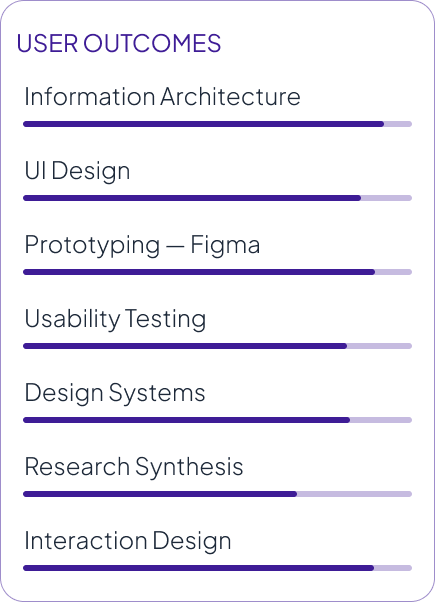
User Outcomes
  • No single place to find or compare past projects
  • Knowledge lost when team members leave
  • Every project starts completely from scratch
  • No audit trail for deliverables or decisions
Business Outcomes
  • Multiple disconnected tools not integrated
  • Manual effort to compile deliverables
  • Version control informal or non-existen
  • Historical data required days of chasing people

Usability Testing

Putting the design in front of real users

8 participants · 3 rounds · Moderated remote · Figma interactive prototype

Test Objectives
  • Can users find a comparable project within 90 seconds?
  • Do managers understand the dashboard KPIs unaided?
  • Can users access the 3D Section tool without prompting?
  • Is the Projects vs Archive distinction clear?
  • Are the archive filters comprehensive enough?
Test Results Summary

Participants

08

Task Completion

85%+

SUS Score

78 pts

Iterations

3 rounds
Key findings
  • Filter visibility: 4/8 users missed the filter button — it blended into the search bar.
  • Dashboard KPIs: All 8 users correctly read the KPI cards and colour-coded status system.
  • Nav labels: 3/8 users looked for archived projects inside “Projects” not “Archive.”
  • 3D viewer: 7/8 users found and used the Section tool independently.
  • Clone action: “Clone to New Project” buried in overflow menu — not found without prompting.
  • Search speed: Consistently described as “fast” and “exactly what I expected” post-filtering.

Key Learnings

What this project taught me

Simplicity must be earned

The interface looks simple. The domain isn’t. Every decision required understanding how engineers think about data — then making that invisible to the UI.


Every design decision needed to trace back to a documented finding. A useful constraint regardless of who owns the research.

IA decisions have outsized consequences

One labelling decision — “Archive” vs “Projects” — caused friction throughout testing. Getting IA right early is worth more than getting visual design right first.


Users told us they understood the navigation — then navigated incorrectly in tasks. Testing with scenarios, not questions, reveals what actually needs solving.

Speed is a design value

Users explicitly said: if it’s slow, they won’t use it. Designing for perceived performance — hover states, immediate feedback — was as important as functional design.


What’s next: Side-by-side project comparison view, mobile-responsive layout for on-site access, and a formal building-block contribution workflow.

Reflection

What I brought to this project

Project Flow combined complex engineering workflows with intuitive usability. For engineers, every interaction needed to be fast, clear, and efficient.

The biggest challenge was understanding engineer mental models and making complex data feel simple. Features like the 3D Viewer, Map Archive, and Project Details required careful prioritization.

Working from existing research reinforced a key principle: every decision should be backed by real user insights.

The design improved through user testing and observed behaviour, proving the value of evidence-based design over opinion.

Project Flow — UX Case Study

All project names, client details, and proprietary information anonymised for portfolio presentation.
Research was conducted by the client’s domain team prior to UX engagement.

Thank you!