Automate Design Review

Replacing a 5-tool manual workflow with a unified platform that connects project data, stakeholder communication, and review tracking — purpose-built for a global engineering firm's Design Excellence Board.

Role
Product Designer
Timeline
08 Weeks
Platform
Web App (Internal)
DELIVERABLES
IA · Journey Maps · UI/UX Design
Background


A quality process that was silently failing

The team was responsible for ensuring every medium and high-risk engineering project underwent a formal peer review before reaching the tender stage. The review procedure was well-designed on paper — a 3-person review panel, structured feedback forms, defined timing windows. But in practice, the process was being held together by spreadsheets and email threads.

No one person could see the full state of reviews across active projects. Projects could miss their review window entirely. The team running the process had no way to confirm whether a project owner had even opened the notification email.

Key stakeholders involved:

  1. Heads of Design
  2. Project Owners
  3. Review Teams
  4. Project Managers

The Problem

Every review started with an Excel file

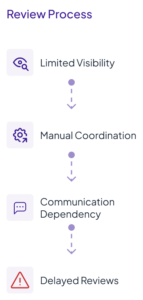
As projects became increasingly dependent on multiple disconnected systems, review coordination became more operationally complex and difficult to manage. Teams frequently switched between spreadsheets, internal tools, email communication, and meetings to track project status, manage reviews, and coordinate stakeholder feedback.

The fragmented workflow introduced delays, limited visibility across the review lifecycle, and increased dependency on manual coordination efforts. As the number of projects and stakeholders continued to grow, maintaining efficient review tracking and communication became increasingly challenging.


Operational Challenges

The review process depended heavily on manual coordination across teams and systems. As projects grew, maintaining visibility and keeping reviews on track became increasingly difficult.

  1. Time-consuming manual filtering
  2. Repetitive email follow-ups
  3. Delayed review coordination
  1. Fragmented project visibility
  2. Difficult review tracking
  3. Risk of missing important projects
  1. Lack of centralized communication
  2. Inefficient stakeholder collaboration

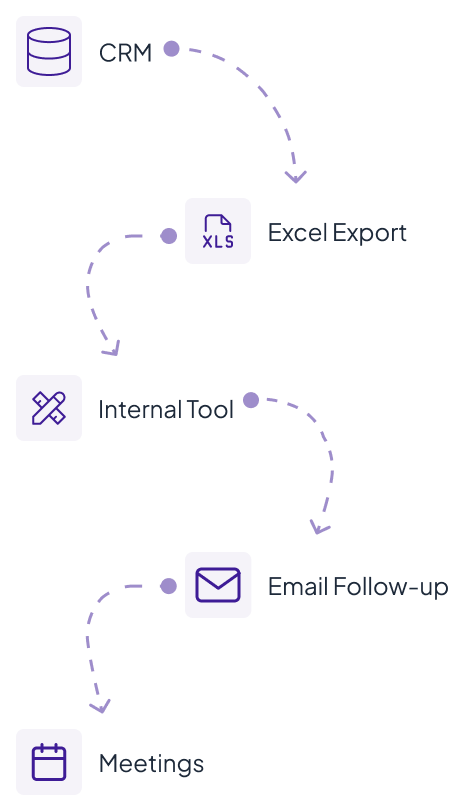
Existing Workflow

Teams relied on multiple tools and manual handoffs to manage project reviews. Information moved across systems through exports, emails, and follow-ups before reaching completion.

Each stage introduced additional manual effort and communication dependency.

Workflow characteristics;

  • Multiple handoffs
  • Manual coordination
  • Repeated context switching

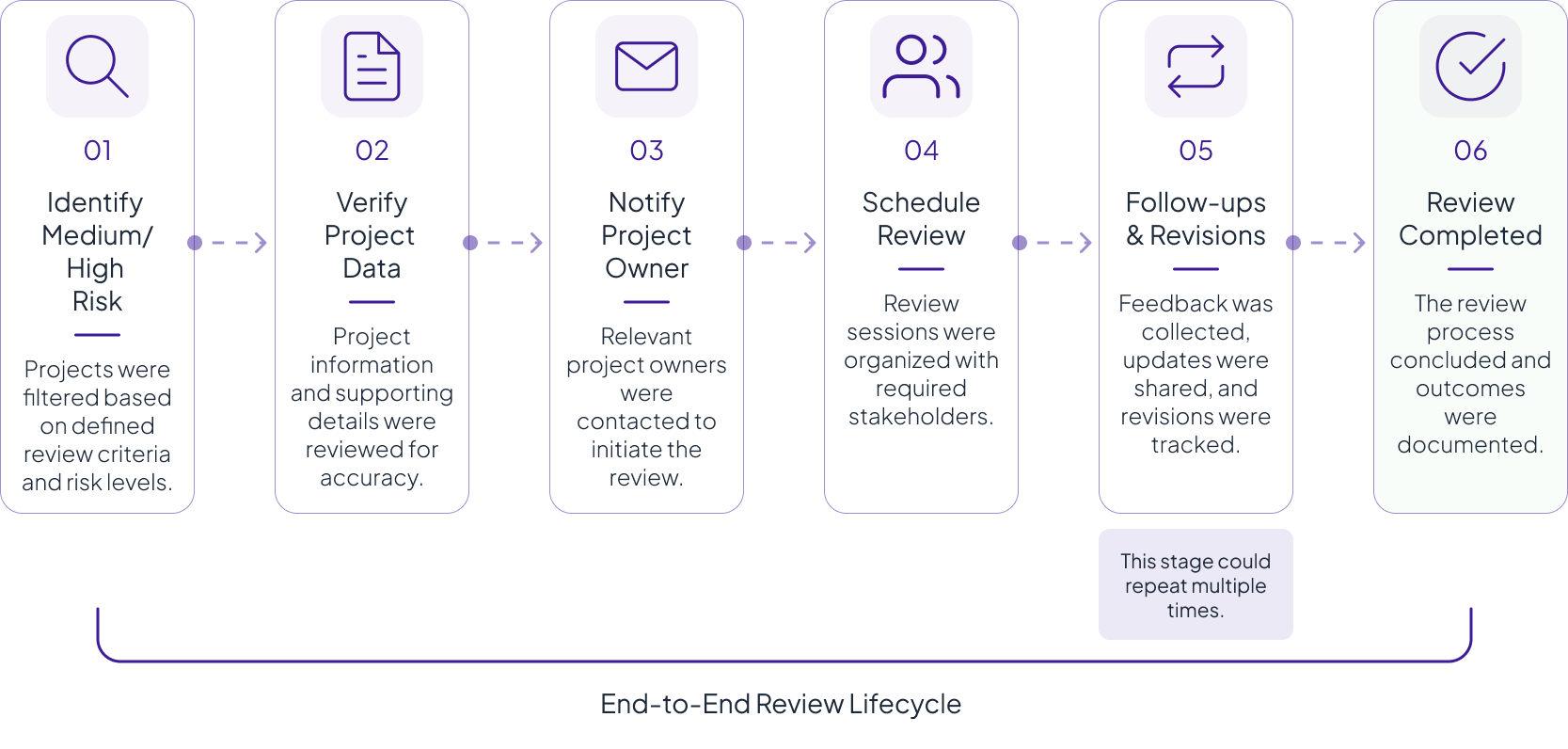
Existing Review Flow

Projects identified as medium or high-risk followed a structured review process involving multiple teams, handoffs, and repeated coordination efforts.

Key Workflow characteristics;

  • Multiple review stages
  • Cross-team coordination
  • Revision loops

Research & Discovery

To better understand the review lifecycle, I analyzed workflows, stakeholder interactions, and coordination patterns across the existing process. The analysis uncovered recurring inefficiencies caused by fragmented systems, manual coordination, and limited visibility throughout the review journey.

Research Activities

Understand roles and collaboration patterns.

Documenting the existing process and handoffs.

Identifying operational gaps and recurring issues.

Reviewing patterns and dependencies across systems.


KEY INSIGHT

The research revealed that operational inefficiencies were not caused by a single tool or workflow, but by fragmented coordination, scattered information, and limited visibility across the review lifecycle.

Project information was difficult to track across multiple systems.

Review activities depended heavily on follow-ups and repeated handoffs.

Critical updates and project data were spread across disconnected tools.

Progress relied heavily on email-based coordination and reminders.


Opportunity Areas

Operational Challenge

  • Manual Excel filtering
  • Fragmented communication
  • Email dependency
  • Poor visibility
  • Repetitive follow-ups
  • Difficult review tracking

Design Opportunity

  • Automated project qualification
  • Centralized activity center
  • Integrated communication system
  • Unified dashboard
  • Notification & reminder workflows
  • Real-time project status monitoring

Defining the Future Workflow

The redesigned experience focused on reducing operational friction and centralizing the entire review lifecycle into a single platform.

Project Identified

Review Qualification

Project Dashboard

Reviewer Coordination

Notification Trigger

Review Scheduling

Feedback & Revisions

Status Tracking

Review Completion

The goal was not only to simplify the interface, but to reduce workflow fragmentation across the organization.


Core Platform Areas

  • Dashboard
  • Projects
  • Review Management
  • Communication

The architecture also introduced:

  • centralized notifications,
  • activity tracking,
  • follow-up reminders,
  • meeting scheduling,
  • and review history management.

IA Goals

  • Reduce navigation complexity
  • Improve task discoverability
  • Centralize communication workflows
  • Simplify review coordination
  • Improve project visibility

Information Architecture

To support complex enterprise workflows, I structured the platform into four primary modules:


Solution

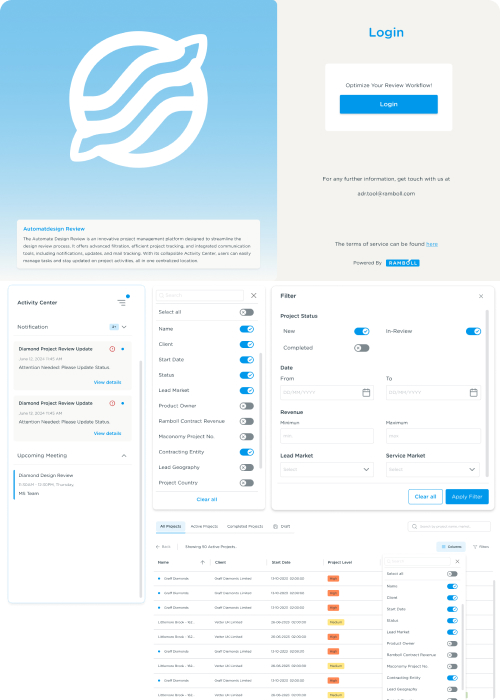
Designing the Dashboard

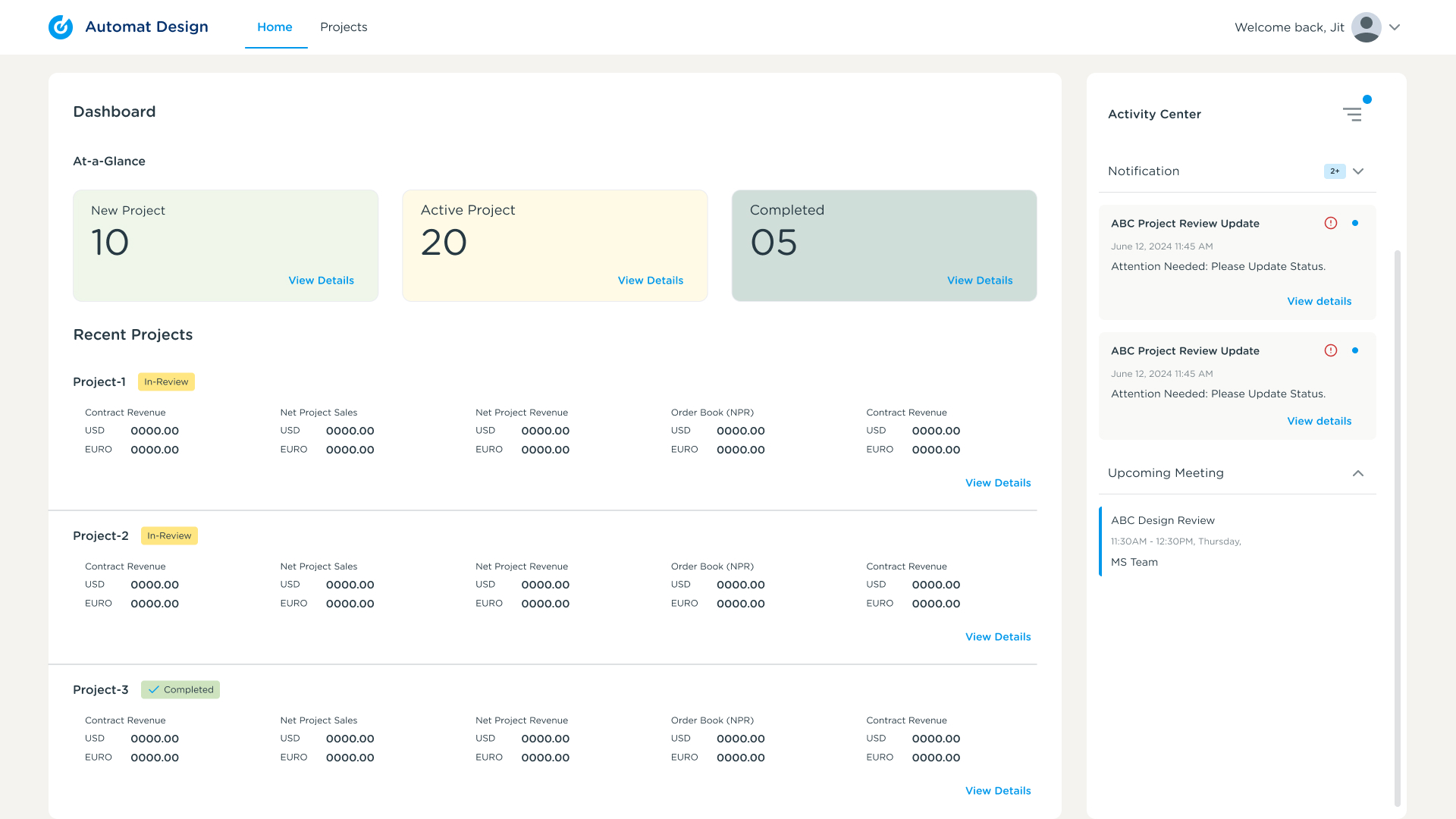
The dashboard was designed to centralize project visibility, streamline review coordination, and reduce operational dependency across fragmented workflows. The experience focused on helping teams quickly identify review-qualified projects, monitor review status, track communication, and take immediate action from a single interface.


Centralized Project Visibility

The dashboard centralized project tracking, review coordination, notifications, and operational updates into a single workflow experience. Teams could monitor review-qualified projects and ongoing activities without switching between disconnected systems.

Highlights

  1. Unified project overview
  2. Centralized operational visibility
  3. Faster review monitoring

Streamlining Project Qualification

The filtering workflow helped teams quickly identify review-qualified projects based on risk level, project type, and operational criteria, reducing dependency on manual spreadsheet filtering

Highlights

  1. Faster project qualification
  2. Reduced manual filtering effort
  3. Improved workflow efficiency

Unified Project Review Experience

The project detail view consolidated operational project information, stakeholder details, and review status into a structured review interface, improving visibility across the review lifecycle.

Highlights

  1. Centralized project information
  2. Reduced system switching
  3. Improved review visibility

Reducing Cross-System Fragmentation

The redesigned workflow reduced dependency on disconnected systems by centralizing project verification and operational review workflows into a more connected experience.

Highlights

  1. Simplified verification workflows
  2. Reduced operational friction
  3. Improved workflow consistency

Integrated Communication Workflow

The communication workflow centralized follow-ups, reminders, scheduling, and stakeholder coordination within the same operational experience.

Highlights

  1. Centralized communication tracking
  2. Improved follow-up management
  3. Reduced email dependency

Activity Tracking & Operational Awareness

The activity center provided real-time visibility into notifications, reminders, updates, and review progress throughout the workflow lifecycle.

Highlights

  1. Real-time operational updates
  2. Centralized activity tracking
  3. Improved workflow awareness

The redesigned experience focused on simplifying operational complexity by centralizing project visibility, review coordination, and stakeholder communication into a more connected enterprise workflow.


Design Decisions

The solution focused on reducing operational complexity while balancing information density, workflow visibility, and communication coordination across the enterprise review lifecycle.

Why table-first layouts?

Enterprise users needed to scan and compare large volumes of project data efficiently. A structured table layout improved readability, project comparison, and operational visibility across ongoing review workflows.

  • Faster project scanning
  • Better information visibility
  • Improved data comparison

Why a persistent activity center?

Users frequently switched between tracking, communication, and follow-up workflows. The activity center centralized notifications, reminders, and updates into a single operational view to reduce context switching.

  • Centralized operational awareness
  • Reduced workflow fragmentation
  • Faster access to ongoing activities

Why centralized communication?

Review coordination relied heavily on repeated email follow-ups and fragmented communication threads. Integrating communication within the workflow improved continuity and reduced dependency on external coordination tools.

  • Improved follow-up visibility
  • Reduced communication dependency
  • Better stakeholder coordination

Why Centralized Project Information?

Project data existed across multiple disconnected systems, creating repetitive verification workflows. Centralizing project information simplified review coordination and improved workflow visibility.

  • Reduced system switching
  • Simplified verification workflows
  • Improved operational consistency

Why Structured Filtering Workflows?

Manual filtering through spreadsheets created operational overhead and increased the risk of missing review-qualified projects. Structured filtering simplified project qualification and improved discoverability across the workflow

  • Faster qualification workflows
  • Reduced manual effort
  • Improved operational efficiency

Challenges

Designing for enterprise review workflows required balancing operational complexity, workflow visibility, communication coordination, and information-heavy interfaces within a structured experience.

Balancing Data Density

Enterprise workflows required large volumes of project information while maintaining readability and usability.

  • Information-heavy interfaces
  • Workflow visibility
  • Structured data presentation

Reducing Workflow Fragmentation

The existing process relied on disconnected systems for tracking, communication, and project verification.

  • Simplifying operational workflows
  • Reducing system dependency
  • Improving workflow continuity

Supporting Multiple Stakeholders

Different stakeholders interacted with the system differently across review coordination, tracking, and feedback workflows.

  • Multiple workflow requirements
  • Cross-functional coordination
  • Consistent workflow experience

Simplifying Review Coordination

Review coordination relied heavily on manual follow-ups, reminders, and communication workflows.

  • Reducing operational friction
  • Improving communication continuity
  • Supporting scalable coordination workflows

Why Structured Filtering Workflows?

Manual filtering through spreadsheets created operational overhead and increased the risk of missing review-qualified projects. Structured filtering simplified project qualification and improved discoverability across the workflow

  • Faster qualification workflows
  • Reduced manual effort
  • Improved operational efficiency

Outcome

The redesigned workflow improved operational visibility, review coordination, and workflow continuity across the enterprise review lifecycle.

Centralized Visibility

Improved project tracking and operational awareness across review workflows.

Reduced Operational Overhead

Simplified manual coordination, follow-ups, and fragmented review workflows.

Improved Review Coordination

Supported faster stakeholder communication and review management.

Scalable Workflow Experience

Created a more structured and connected enterprise review process.


Reflection

This project helped me better understand how enterprise UX extends beyond interface design into workflow orchestration, operational systems thinking, and stakeholder coordination.

Designing for enterprise review workflows required balancing information-heavy interfaces, fragmented operational processes, and communication-driven coordination within a structured experience.

What I Learned

  1. Enterprise workflows are often operationally complex rather than visually complex
  2. Visibility and coordination can be more critical than adding new features
  3. Simplifying workflows requires understanding cross-system dependencies and stakeholder behaviors

Reflection

This project helped me better understand how enterprise UX extends beyond interface design into workflow orchestration, operational systems thinking, and stakeholder coordination.

Designing for enterprise review workflows required balancing information-heavy interfaces, fragmented operational processes, and communication-driven coordination within a structured experience.

What I Learned

  1. Enterprise workflows are often operationally complex rather than visually complex
  2. Visibility and coordination can be more critical than adding new features
  3. Simplifying workflows requires understanding cross-system dependencies and stakeholder behaviors

Crazy 8s Concepts


Eight concepts explored in rapid sketching included: a command-line style search interface, a project graph/network visualisation, a Kanban-style portfolio board, a file-system-like hierarchical browser, a chat-first interface with a project assistant, a map-based archive for geographic search, a comparison table tool, and a dashboard-first single-page approach. The map-based archive, the dashboard overview, and the comparison approach all survived to IA exploration.


Prioritisation Matrix

Feature

Impact

Effort

Projects Dashboard

High

Medium

Archive + Search

High

High

3D Model Viewer

Medium

High

Building Blocks

High

High

Project Comparison

High

Medium